Dynamics
Compressor
14 compression styles
One compressor, fourteen characters — from transparent control to obvious colour.
- 14 compression styles
- Auto threshold, auto release and auto gain
- Knee, range, lookahead and hold
- Character section with drive
- Side-chain EQ
- Dry mix and oversampling
Dynamics
RK-Stress
Characterful compressor
An aggressive, musical compressor with eight ratios, a shaped detector and two distortion colours.
- Input, attack, release and output dials
- Eight ratios from 1:1, including an opto mode
- Detector high-pass, bell and stereo link
- Audio high-pass and two distortion modes
- Parallel mix
- Gain-reduction ladder, redline and THD lights
Dynamics
FET Limiter
FET peak limiter
A fast FET-style peak limiter: drive it with the input, pick the ratio with a button.
- Input and output
- Attack and release
- Ratios 4, 8, 12, 20:1 and an all-buttons mode
- VU meter
Dynamics
Opto Leveler
Optical tube leveler
Two knobs and a needle: smooth optical levelling with a program-dependent release.
- Gain and peak reduction
- Program-dependent optical release
- Tube colour
- VU meter
Dynamics
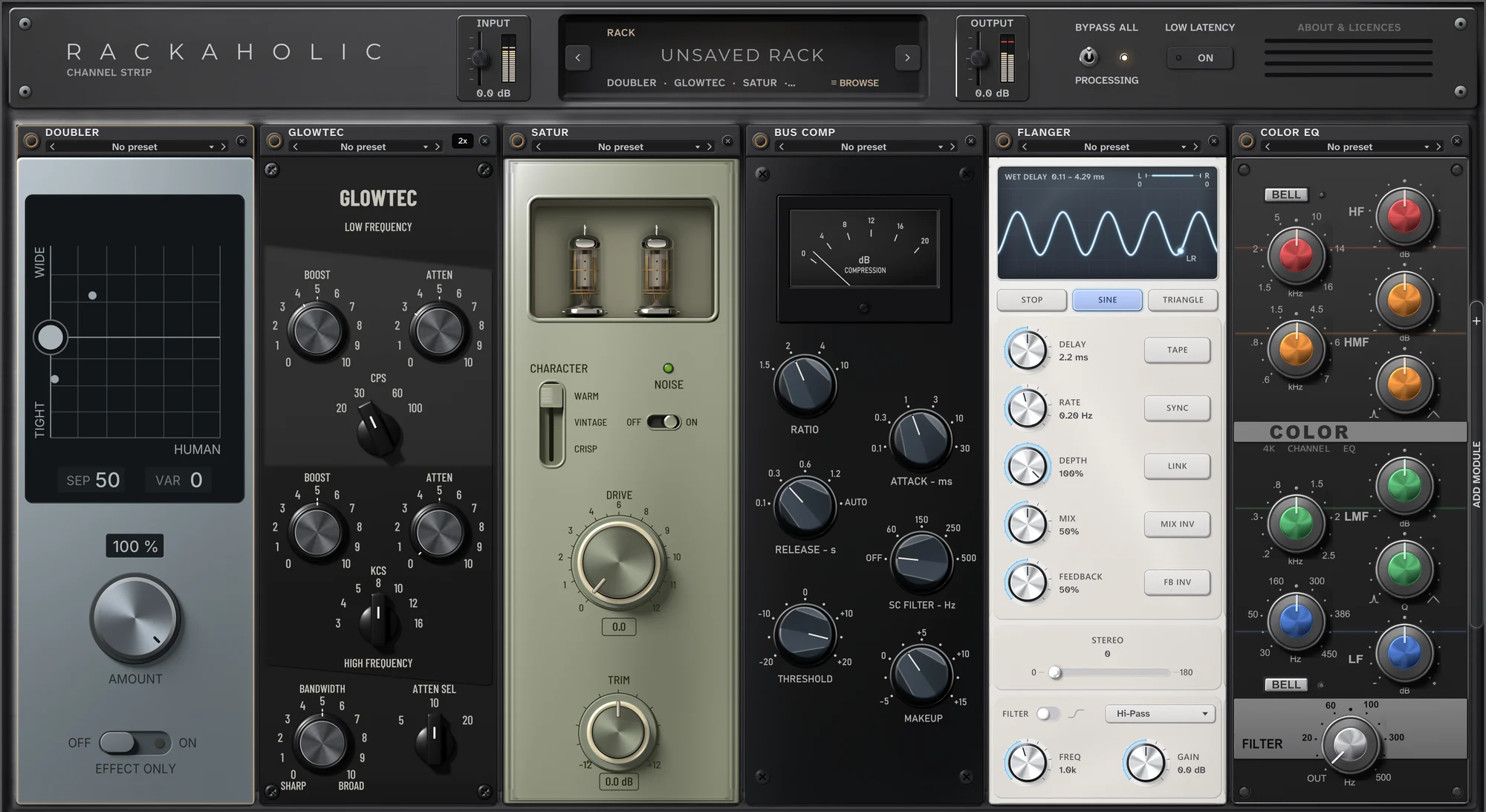
Bus Comp
Stereo bus compressor
Console-style glue for mixes, drums and groups.
- Ratio from 1.5 to 10
- Stepped attack and release, plus auto release
- Side-chain high-pass filter
- Threshold and makeup
- Gain-reduction meter
Dynamics
De-esser
Formant-aware de-esser
Tames sibilance without dulling the voice.
- Threshold and range
- Lookahead
- Monitor: hear what is removed
- Wide or split processing
- Gain-reduction display
Tone
Glowtec
Passive tube program EQ
Boost and cut the same low band for that tight, deep low end; add air on top.
- Low boost and attenuation at 20, 30, 60 or 100 Hz
- High boost from 3 to 16 kHz with bandwidth
- High attenuation at 5, 10 or 20 kHz
- Tube and transformer colour
- Oversampling off or 2x
Tone
Color EQ
Four-band console EQ
A channel-strip equaliser with the colour of a console.
- HF, HMF, LMF and LF bands
- Bell option on HF and LF
- Q on both mid bands
- High-pass filter from 20 to 500 Hz
- Console colour
Tone
Air
Dynamic high-end lift
Opens up the top of a vocal or a mix and backs off by itself on harsh peaks.
- Mid air from 4 kHz and high air from 10 kHz
- Dynamic: the lift eases off on loud, harsh moments
- Band link and trim
- Live top-end display
Tone
Distortion
Vocal distortion and tone
Two sections for grit and tone: pick a flavour, turn one big knob.
- Drive: soft, grit or burn
- Tone: air, sweep or phone
- Amount from −10 to +10 in each section
Tone
Satur
Console saturation
Warmth and density from three console characters, with tubes that glow as you drive them.
- Three characters: warm, vintage and crisp
- Drive and trim
- Optional noise
- Tubes glow with the drive
Tone
Studio Sat
Compander and valve saturation
A compander into a valve desk, with a tape machine turning on the screen.
- Mix
- Post-EQ high shelf
- Input and output meters
- Animated tape-machine display
Space
Delay
Tape, BBD and digital echo
Thirty echo styles, from warm tape to clean digital, with dual, ping-pong and rhythm modes.
- 30 styles: tape, BBD and digital
- Single, dual, ping-pong and rhythm modes
- Echo time in milliseconds or note values
- Feedback, mix and saturation
- Low cut, high cut, input and output
- Tweak page: width, offset, balance and accents
Space
Reeverb
Endless hall and chorused room
Two big, ready-made spaces: an epic long hall and a chorused room.
- Infinity and Chorus modes
- Decay with a live RT60 readout
- Dry / wet mix
Space
Chorus
Stereo chorus
Wide, smooth stereo chorus with four modes you can combine.
- Modes 1 to 4, in any combination
- Mono or stereo input
- Mix
Space
Doubler
Natural vocal doubles
Turns one vocal take into a natural, wide double.
- Amount
- Stereo separation, from tight to wide
- Human variation
- Effect-only switch
Space
Flanger
Tape thru-zero flanger
Tape-style flanging, from subtle movement to deep jet sweeps.
- Delay, rate, depth, mix and feedback
- Tape, sync and link modes
- Mix and feedback invert
- Stereo phase
- Wet filter with frequency and gain
- LFO: stop, sine or triangle
Pitch
Tune
Scale-locked pitch correction
Pitch correction locked to your key and scale, from natural to hard-tuned.
- Key and scale
- Tune speed
- Humanity
- Live note display
Pitch
Pitch
Polyphonic transposer
Shifts whole parts — chords included — by semitones and cents.
- Semitones and cents
- Four engine modes: sync, smooth, transient and punchy
- Interval and ratio readouts
- Input and output spectrum